Spread vs Rest Operators in JavaScript
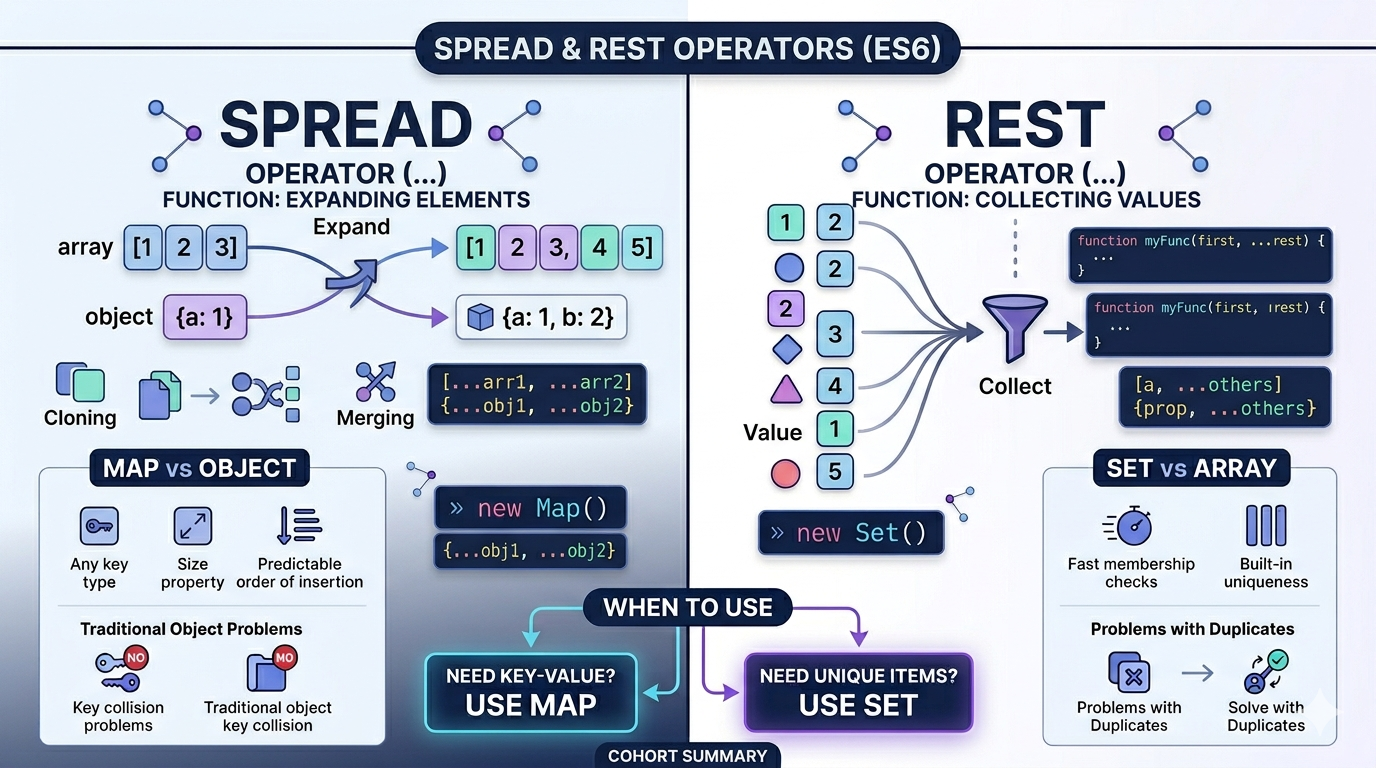
Topics to Cover
What spread operator does
What rest operator does
Differences between spread and rest
Using spread with arrays and objects
Practical use cases
Spread vs Rest Operators in JavaScript (Explained with Import & Export 📦)
Imagine JavaScript is a big warehouse where packages are sent and received.
Two important workers help handle packages:
Spread operator (...) → opens packages and spreads items out
Rest operator (...) → collects many items and packs them into one box
Both use the same symbol ..., but they do different jobs depending on where they are used.
Let’s understand them using a simple import/export story.
What is the Spread Operator? 📦➡️📤
The spread operator is like exporting items from a box and spreading them out.
Imagine a package arrives with toys.
Box: [Car, Robot, Ball]
When we spread the box, the toys come out individually.
JavaScript Example
const toys = ["Car", "Robot", "Ball"];

console.log(...toys);
Output:
Car Robot Ball
The box opened and the toys spread out.
So remember:
Spread = expanding items
Spread with Arrays
Sometimes we want to combine multiple boxes.
Example:
const avengers = ["Ironman", "Thor"];
const xmen = ["Wolverine", "Storm"];

const heroes = [...avengers, ...xmen];

console.log(heroes);
Output:
["Ironman", "Thor", "Wolverine", "Storm"]
The spread operator opens both boxes and combines them.
Visual Idea (Diagram)
Box A: [Ironman, Thor]
Box B: [Wolverine, Storm]

Spread them

Result:
[Ironman, Thor, Wolverine, Storm]
Spread with Objects
Spread also works with objects.
Example:
const user = {
  name: "Logan",
  power: "Healing"
};

const updatedUser = {
  ...user,
  team: "X-Men"
};

console.log(updatedUser);
Output:
{
 name: "Logan",
 power: "Healing",
 team: "X-Men"
}
Spread copies everything and adds new values.
What is the Rest Operator? 📥📦
The rest operator does the opposite job.
Instead of spreading things out, it collects many items into one box.
Think of it as importing many packages and putting them in one container.
Example:
Items arriving: Apple Banana Mango

Rest collects them

Box: [Apple, Banana, Mango]
Rest Operator in Functions
Example:
function collectFruits(...fruits) {
  console.log(fruits);
}

collectFruits("Apple", "Banana", "Mango");
Output:
["Apple", "Banana", "Mango"]
The rest operator collected all fruits into one array.
So remember:
Rest = collecting items
Rest with Destructuring
Example:
const heroes = ["Ironman", "Thor", "Hulk", "Spiderman"];

const [leader, ...team] = heroes;

console.log(leader);
console.log(team);
Output:
Ironman
["Thor", "Hulk", "Spiderman"]
Ironman became the leader.
The rest of the heroes were collected into team.
Visual Idea (Diagram)
Heroes arriving:

Ironman Thor Hulk Spiderman

Leader takes first position

Rest collected into team

team = [Thor, Hulk, Spiderman]
Spread vs Rest ⚔️
| Feature | Spread | Rest |
|---|---|---|
| Purpose | Expands values | Collects values |
| Direction | One box → many items | Many items → one box |
| Use cases | Copy, merge arrays/objects | Function parameters |
| Symbol | ... |
... |
Simple rule:
Spread → opens the box
Rest → packs the box
Practical Use Cases
1 Copying Arrays
Without spread:
const arr1 = [1,2,3];
const arr2 = arr1;
This copies reference, not values.
With spread:
const arr1 = [1,2,3];
const arr2 = [...arr1];
Now it's a real copy.
2 Merging Arrays
const frontend = ["HTML","CSS"];
const backend = ["Node","Database"];

const fullstack = [...frontend, ...backend];
Result:
["HTML","CSS","Node","Database"]
3 Flexible Function Arguments
Rest lets functions accept any number of inputs.
function add(...numbers) {
  return numbers.reduce((a,b) => a+b);
}

console.log(add(1,2,3,4));
Output:
10
Simple Way to Remember 🧠
Think of Import & Export boxes.
Spread = Exporting items out of a box
[Apple, Mango] → Apple Mango
Rest = Importing many items into one box
Apple Mango Banana → [Apple, Mango, Banana]
Final Summary 📦
Spread Operator ...
Expands arrays or objects
Used for copying and merging
Works with arrays and objects
Example:
const newArray = [...oldArray];
Rest Operator ...
Collects multiple values
Mostly used in functions
Creates arrays automatically
Example:
function example(...items) {}
✅ Now you know the Spread and Rest operators in JavaScript using the Import/Export warehouse story.


